Device Power-on and Power-off

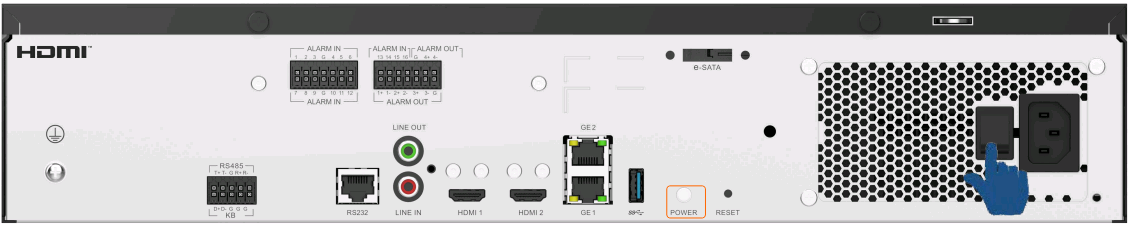
After you press the power button to shut down the device, you are advised to press the power button to power on the device. If you want to power on the device through the power switch, turn off the power switch, wait for 60s, and then turn on the power switch to protect the post-stage circuit.
Device Power-off
Procedure
The following uses HWT-IVS1800-E08 as an example to describe how to power off a device.
- Use either of the following methods to shut down the device based on the site requirements:
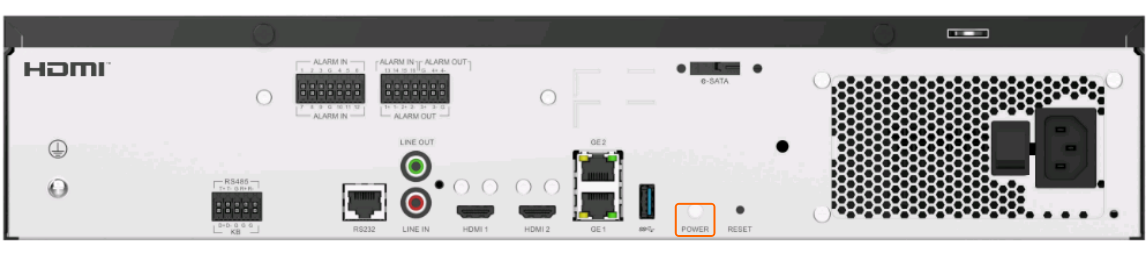
- Safe shutdown: Press and hold down the power button (as shown in Figure 6-12) for more than 2s and release it. The buzzer beeps, indicating that the device enters the safe shutdown state.
- Forcible shutdown: Press and hold down the power button (as shown in Figure 6-12) for more than 10s and release it. Then the device enters the forcible shutdown state.
- Turn off the power switch (as shown in Figure 6-13) to power off the device.
Device Power-on
Procedure
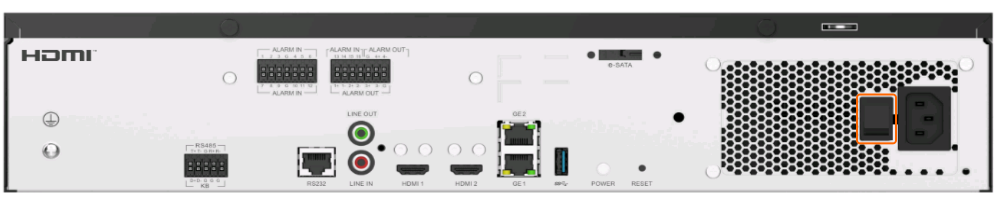
- Turn on the power switch to power on the device. Here, HWT-IVS1800-E08 is used as an example, as shown in Figure 6-14.