Configuring Connection to a Video Security Platform Through the GB/T 28181 Protocol
The section describes how to connect a camera to the IVS platform through GB/T 28181. The GB/T 28181 protocol supports only the active access mode.

If the GB/T 28181 protocol is used, deploy the camera on a dedicated network.
Setting GB/T 28181 Parameters
This section describes how to set GB/T 28181 parameters if a camera needs to connect to the platform through the GB/T 28181 protocol.
A camera can be registered with two platforms through GB/T 28181. When a camera is registered with multiple platforms, if the platforms synchronize NTP server time to the camera at the same time, the camera time may be discontinuous. You are advised to keep only one platform that can synchronize NTP server time to the camera.

- For cameras that support dual network ports, you need to configure the GB/T 28181 protocol for the two network ports separately.
- The GB/T 28181 protocol supports independent upgrade. For details about how to obtain and install the upgrade package, see Upgrading the Camera Version/Algorithms.
- You can query a maximum of 500 recording segments at a time. If the number of recording segments within the specified query period exceeds 500, change the start time and end time.
Prerequisites
- The GB/T 28181 protocol supports MD5 and SHA256 digest authentication. The MD5 algorithm is vulnerable, which may cause security risks. The MD5 is a weak algorithm, which does not encrypt signaling and media streams for transmission. Therefore, the protocol must be used on a trusted network to prevent security risks.
- You have obtained the values of the parameters (for example, device ID) for connecting cameras to the video security platform through the GB/T 28181 protocol.
Setting the System Time
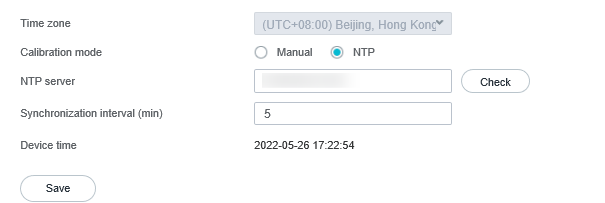
To connect a camera to the platform through the GB/T 28181 protocol, ensure that the camera is time-synchronized with the NTP server. The capabilities supported vary between camera models.
- Log in to the camera web system (https://Camera IP address).
- Choose Configuration > System > System Settings > Time.
The Time tab page is displayed, as shown in Figure 4-133.
- Set the system time, as shown in Figure 4-133.
- Select a time zone from the Time zone drop-down list box.
- Set Calibration mode to NTP.
- Set NTP server.
- If the camera is to be connected to a single IVS platform, set this parameter to the IP address of the IVS platform.
- If the camera is to be connected to a cluster, set this parameter to the floating gateway IP address of the cluster.
- Click Save.
Setting GB/T 28181 Parameters
- Log in to the camera web system (https://Camera IP address).
- Choose Configuration > Network > Platform Connection > Common Protocol Parameters and click T28181.
To register with two platforms, click the T28181.2 tab and configure information about the other platform. You can set GB 35114 protocol parameters only on the T28181 tab page.
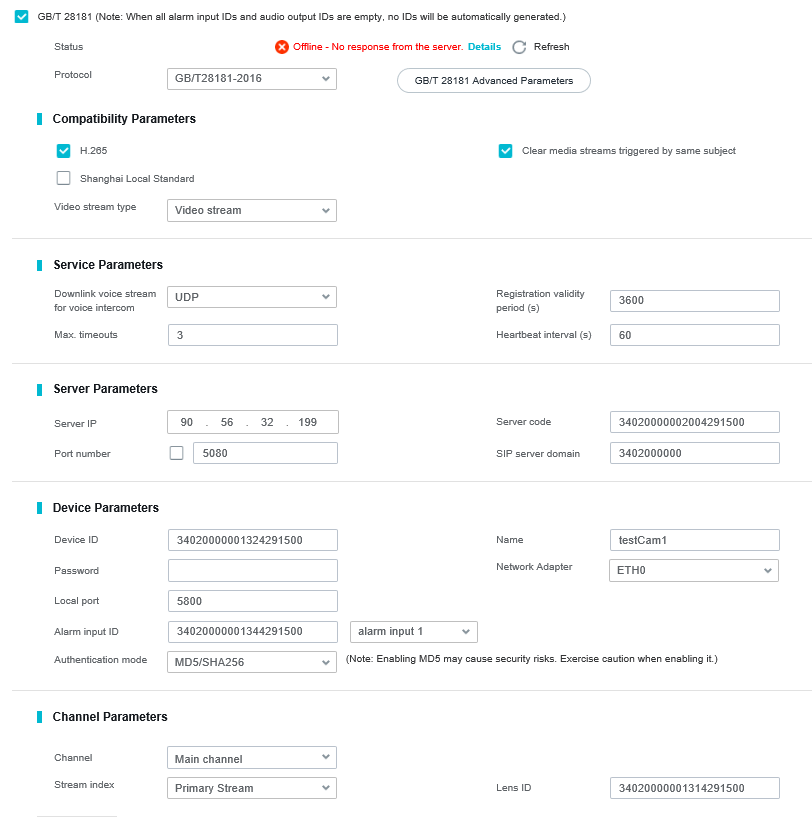
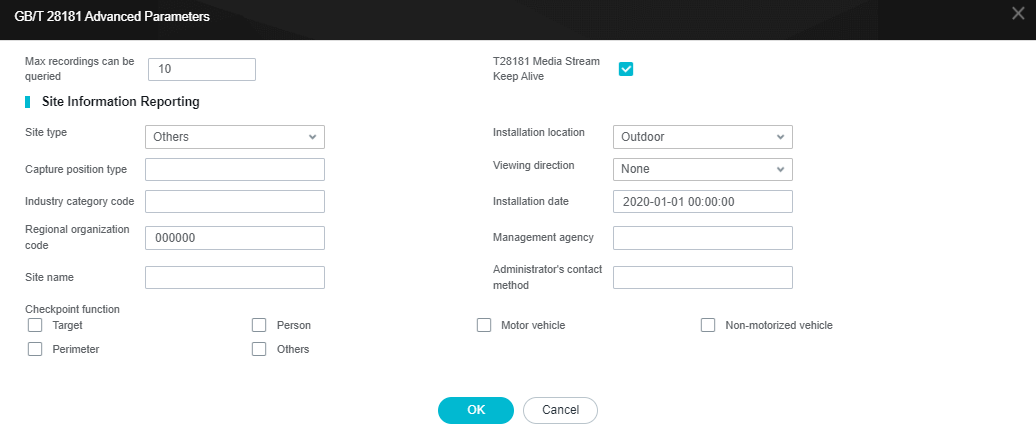
- Set GB/T 28181 parameters, as shown in Figure 4-134 and Figure 4-135. Table 4-60 and Table 4-61 describe the parameters. The parameters displayed on the web page vary between camera models.
Table 4-60 GB/T 28181 parameters
Parameter
Description
GB/T 28181
Indicates whether to enable the GB/T 28181 protocol.
Status
Connection status between the camera and the platform. You can click Details to view the connection details and click Refresh to refresh the connection status.
Protocol
Protocol type. You can select a value from the drop-down list box. The default value is GB/T 28181-2016.
NOTE:- In addition to the default protocol, the camera also supports the GB/T 28181-2022 and TCC-VMS-2020 protocols.
- If TCC-VMS-2020 is selected, the active and standby servers can be configured. When the active (standby) server fails, services are automatically switched to the standby (active) server.
Compatibility Parameters
H.265
Indicates whether to support the H.265 and H.264 encoding protocols when the camera is connected to the platform through the GB/T 28181 protocol.
If this parameter is not selected, only the H.264 encoding protocol is supported when the camera is connected to the platform through the GB/T 28181 protocol.
Clear media streams triggered by same subject
Indicates whether to obtain only one channel of video streams if the platform requests video streams with the same subject ID.
If this parameter is not selected, multiple channels of video streams can be obtained if the platform requests video streams with the same subject ID.
Shanghai Local Standard
Indicates whether to support the Shanghai local protocol.
NOTE:If the Shanghai local standard is enabled, the image capture function of the platform does not take effect.
Video stream type
Video stream: sends only video streams.
Service Parameters
Downlink voice streams for voice intercom
Protocol of downlink voice streams for voice intercom. The value can be UDP or TCP.
NOTE:If the camera and the platform are on different network segments, you are advised to set this parameter to TCP.
Max. timeouts
Maximum number of consecutive heartbeat timeouts. If the actual number reaches the value specified by this parameter, the camera cannot connect to the platform.
The default value 3 is recommended.
NOTE:The value of Max. timeouts for the camera and platform must be the same.
Registration validity period (s)
Validity period of the camera registration with the video security platform. The default value is 86400 (one day).
NOTE:- If the device fails to be registered within 86400s, the registration fails. You are advised to use the default value.
- Before the validity period expires, the device initiates a registration request to the platform again.
Heartbeat interval (s)
Time interval at which the camera sends heartbeat messages. The default value 60 is recommended.
NOTE:The camera and the platform must have the same heartbeat interval.
Server Parameters
Server IP
- If the camera needs to connect to the IVS1800 platform, enter the IP address of the platform.
- If the camera needs to connect to the IVS3800, enter the floating gateway IP address of the MPU cluster.
If the server and camera are on different networks and NAT is deployed, set this parameter to the post-NAT IP address of the cluster floating gateway.
Port number
Port number for the platform to listen on cameras connecting to the platform through GB/T 28181. The default value is 5060.
To connect to the IVS platform, change the value to 5080.
After selecting the Port number check box, you can configure the port number range.
Server code
GB/T 28181 server code. Enter a string of 1 to 64 characters, including letters and digits.
NOTE:If a camera is to be connected to the IVS platform, the eleventh to thirteenth digits of the server code must be 200.
SIP server domain
Domain name that consists of 1–127 digits.
Device Parameters
Device ID
Unique ID of a device. The value is a string of 1 to 64 characters, including letters and digits. The value must be the same as the connection code configured on the platform.
NOTE:- This parameter is mandatory. If you do not set it, the camera cannot go online.
- If a camera is to be connected to the IVS platform, the eleventh to thirteenth digits of the camera ID must be 132. Besides, the camera ID must be different from the lens ID. Otherwise, you cannot view live video from the camera on the platform.
Password
Password used by a camera to register with the platform.
NOTE:- The value of this parameter must be the same as the registration password configured on the platform. If they are different, the camera will fail to connect to the platform.
- For details about the password requirements, see Notices About Passwords in the product documentation.
Name
Login name used for registering a camera with the platform. The value can contain digits or other characters.
Network Adapter
For a camera with dual network ports, you can select ETH0 or ETH1.
NOTE:To register a camera with two platforms, you can select the same network adapter for the two platforms.
Local port
Port number of the camera when the camera is connected to the SIP server.
NOTE:The value is an integer ranging from 1024 to 65535.
Alarm input ID
Alarm input ID of the device. The value is a string of 0 to 64 characters, including letters and digits.
If there are multiple alarm input channels, you need to specify a unique ID for each channel.
NOTE:- Some C/D series cameras do not support this parameter.
- You need to manually enter the value. The eleventh to thirteenth digits must be 134. Otherwise, the IVS platform cannot report alarms properly.
Authentication mode
- SHA256: Only the SHA256 authentication mode is supported.
- MD5/SHA256: Both MD5 and SHA256 authentication modes are supported.
NOTE:- The MD5 authentication mode has security risks. Therefore, you are advised to use the SHA256 authentication mode.
- The value of this parameter must be the same as that configured on the platform. Otherwise, the registration fails.
Channel Parameters
Channel
Channel type of the camera.
Stream index
Type of streams to be sent to the platform. You can select the primary stream or a secondary stream. The default value Primary Stream is recommended.
Lens ID
Camera ID. The value is a string of 0 to 64 characters and can contain letters and digits.
For a multi-lens camera, you need to specify a unique ID for each lens.
NOTE:If a camera is to be connected to the IVS platform, the eleventh to thirteenth digits of the lens ID must be 131 or 132. Otherwise, live video from the camera cannot be viewed on the platform.
Table 4-61 Advanced GB/T 28181 parametersParameter
Description
Max recordings can be queried
Maximum number of recordings carried in a packet during recording query when GB/T 28181 is used for platform connection.
Enter an integer ranging from 1 to 20. The default value is 10. If the platform limits the packet size, you can properly adjust the value of this parameter. Adjusting the value of this parameter affects the recording query speed. Adjust the value based on the site requirements.
T28181 Media Stream Keep Alive
This function is disabled by default. When this function and the media stream keep-alive function are enabled at the same time, RTCP keep-alive packets can be sent. If the platform supports the keep-alive function, you are advised to enable this function.
Site Information Reporting
Site type
Type of the site. The options include Class-1, Class-2, Class-3, and Others.
Capture position type
Type of the capture position. The value is a string of seven digits.
Industry category code
Industry category code of the site. The value is a string of 0 to 4 digits.
Regional organization code
Regional organization code of the site. The value is a string of six digits.
Site name
Name of the site. The value is a string of 0 to 254 characters, including letters and digits.
Installation location
Site installation location. The options include Indoor, Outdoor, and None.
Viewing direction
Viewing direction. The options include East, West, South, North, Southeast, Northeast, Southwest, Northwest, and None.
Installation date
Time when a camera is installed.
Management agency
Agency that manages the camera. Enter a string of 0 to 254 characters (including letters and digits).
Administrator's contact method
Contact information of the camera administrator. Enter a string of 0 to 254 characters (including letters and digits).
Checkpoint function
Camera function that can be reported through GB/T 28181. The options include Target, Person, Motor vehicle, Non-motorized vehicle, Perimeter, and Others.
- Click Save.
Adding Cameras to the IVS Platform
This section describes how to use the iClient to connect cameras to the IVS1800 and IVS3800. Cameras can be connected in batches automatically, in batches manually, or one by one manually.
- For details about how to use the iClient S100 to connect cameras to the IVS1800, see Video Service Management (for IVS1800) in the iClient S100 User Guide.
- For details about how to use the iClient to connect cameras to the IVS3800, see Device Management in the iClient Product Documentation.
For details, see Obtaining Documentation and Software in the product documentation or the online help on the iClient.