Image Encoding
- Log in to the camera web system (https://Camera IP address).
- Choose .
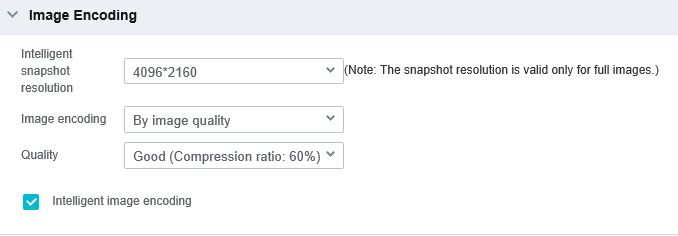
- Click Image Encoding. The Image Encoding area is displayed, as shown in Figure 4-102.
- Set image encoding parameters. Table 4-41 describes the parameters.Table 4-41 Image encoding parameters
Parameter
Description
Intelligent snapshot resolution
Resolution of intelligent snapshots. A higher resolution indicates clearer images but more bandwidth and storage space occupied.
Image encoding
Mode in which snapshots taken for intelligent services are encoded.
- By image quality: After you select this option, you need to set the quality of snapshots and combined images. Then the images are encoded by selected quality.
- By image size: After you select this option, you need to set the size of snapshots and combined images. Then the images are encoded by specified size.
Quality
This parameter is available only when Image encoding is set to By image quality.
A higher image quality indicates more storage space occupied.
If you set Quality to Supreme (Compression ratio: 90%) with the highest resolution, video stuttering may occur during live video viewing because a large amount of data is transmitted during snapshot taking. Therefore, you are advised not to set Quality to Supreme (compression ratio: 90%).
Size (KB)
This parameter is available only when Image encoding is set to By image size.
Size of the original image, in KB. Size of the combine image = (Number of original images + Number of close-up images x 0.5) x Value of this parameter.
If the parameter is set to a too small or too large value, the actual size of an encoded image cannot reach the value. For example, if you set the parameter to 10 (a too small value), due to too high image resolution or rich scene details, the size of the encoded original image may be greater than 10 KB.
Intelligent image encoding
Indicates whether to enable intelligent image encoding. After intelligent image encoding is enabled, different compression policies are used for regions of interest (ROIs) and non-ROIs. This saves network bandwidth and storage space while ensuring high image quality in ROIs.
NOTE:An ROI is a specific area in the video image, for example, an object classification area.
- Click Save. To reset the parameters on this page, click Restore Defaults.