Management Layer Security
- System Maintenance Security Principles
- Suggestions on Account Maintenance
- Suggestions on Password Maintenance
- Suggestions on Log Maintenance
- Suggestions on Security Evaluation
- Suggestions on Backup
- Suggestions on Network Connection Changes
- Suggestions on Defect Reports
- Suggestions on Secure Data Destruction
- Software Package Integrity Protection
- Suggestions on Patch Management
- Security Emergency Response Mechanism
System Maintenance Security Principles
Minimum Accounts
- Strictly manage accounts based on account policies.
- Strictly control the adding, modification, and deletion of accounts and groups.
- Delete all useless accounts and user groups from the system.
Minimum Permissions
- Assign minimum permissions to system services, groups, and accounts.
- Strictly control permission assignment on the operating system.
- Forbid accounts' access to unnecessary resources.
Dedication Principles
- Ensure that a host runs only one type of services as much as possible.
- Separate the partitions of the system, applications, and data.
Audit Principles
- Detecting operations on a host using logs or other feasible methods.
- Audit failure to access important system resources.
- Audit successful accesses to key system resources.
- Audit successful and failed access control policy modification.
Suggestions on Account Maintenance
Periodically check the accounts as the system administrator as follows:
- Verify that useless database or operating system accounts and temporary accounts are deleted.
- Verify that proper permissions are assigned to accounts.
- Check and audit account login and operation logs.
- When adding a user on the backend, the administrator needs to configure the user password to be forcibly changed upon the first login. For details, see Creating a User.
Suggestions on Password Maintenance
Only users who pass authentication can log in to the application system. The user name and password complexity and password validity period need to be configured based on security requirements.
The password maintenance suggestions are as follows:
- The password of the root user is kept by a dedicated person.
- Passwords are encrypted for transmission and are not transferred by email.
- Passwords must be encrypted for storage.
- Passwords must be changed for system handover.
- When a user does not perform operations within a specified period, lock the screen to prevent unauthorized operations.
- You are advised to periodically change passwords, including the passwords for accessing the operating system, database, and service system. The recommended interval is one month and the maximum interval is three months.
- By default, passwords for logging in to the service system must meet the following requirements:
- Contain 8 to 16 characters. If adjacent letters are arranged in ascending or descending order, they are regarded as only one character.
- Consist of at least two types of the following:
Uppercase letters
Lowercase letters
Digits
Special characters: ` ~ ! @ # $ % ^ & * ( ) - _ = + \ | [ { } ] ; : ' " , < . > / ?
- Cannot contain the user name.
- Cannot be the weak passwords listed in Weak Password List or passwords in similar formats.
The following uses the system administrator as an example to describe how to adjust rules for setting varied accounts' passwords. You can adjust the rules based on the site requirements.- Log in to the OMU portal as the admin user. (
 Logging In to the OMU portal)
 - Choose .
- Set Role to Administrator.
- Set rules for the account's password based on the site requirements.
- Passwords of operating system accounts must meet the following requirements:
- The new password must be different from the old password and cannot be contained in the old password.
- Contain 8 to 64 characters. If adjacent letters are arranged in ascending or descending order, they are regarded as only one character.
- Consist of at least two types of the following:
Uppercase letters
Lowercase letters
Digits
Special characters: ` ~ ! @ # $ % ^ & * ( ) - _ = + \ | [ { } ] ; : ' " , < . > / ?
- Cannot contain the user name.
- Cannot be the weak passwords listed in Weak Password List or passwords in similar formats.
- Passwords of database accounts must meet the following requirements:
- Contain 8 to 32 characters. If adjacent letters are arranged in ascending or descending order, they are regarded as only one character.
- Consist of at least three types of the following:
Uppercase letters
Lowercase letters
Digits
Space characters and the following special characters: ` ~ ! @ # $ % ^ & * ( ) - _ = + \ | [ { } ] ; : ' " , < . > / ?
- Be different from the user name or the user name spelled backwards (case-insensitive).
- Inter-module registration passwords must meet the following requirements:
- Contain 8 to 32 characters. If adjacent letters are arranged in ascending or descending order, they are regarded as only one character.
- Consist of at least three types of the following:
Uppercase letters
Lowercase letters
Digits
Space characters and the following special characters: ~ ` ! @ # $ % ^ & * ( ) - _ + = | { } [ ] : ; ' " < > , . / ? \
Suggestions on Log Maintenance
You can audit logs to detect potential problems. The system records important operations in logs. You can protect log files by access control.
Periodically Checking Logs
Periodically check system logs, program logs, and security logs. If any fault is detected, report it to your upper-level department. If you cannot locate or rectify the fault, contact technical support in a timely manner.
Periodically Backing Up Logs
Periodically back up log files to external storage media such as disks, tapes, and CD-ROMs. After successful backup, delete the original log files to release the space.
Suggestions on Security Evaluation
Enterprise administrators are advised to periodically evaluate the device security, especially under circumstances such as system upgrade, capacity expansion, and network migration.
Suggestions on Backup
Back up data in the following scenarios:
- Before and after routine security maintenance and troubleshooting
- Before patch installation and upgrade
Suggestions on Network Connection Changes
Perform the following operations when a network connection is changed:
- Update the network diagram.
- Update the firewall configuration.
- Update the switching and routing configuration.
Suggestions on Defect Reports
After system maintenance personnel report system attacks to the company, the company uses either of the following methods to resolve the attacks:
- If a security accident occurs, the company's technical support provides remote or onsite support to help the maintenance personnel minimize the attack impacts on the system and complete the accident report.
- If no security accident occurs, the company's technical support records the problem information in the database and forwards it to the R&D team. After the R&D team works out a solution, technical support engineers analyze the solution impacts on onsite services and provide a feasible solution.
Suggestions on Secure Data Destruction
Before a device is repaired or deprecated, data stored on the device must be destructed securely.
Procedure
- Press and hold down the RESET button on the rear panel for about 10 seconds using a needle-type object.
The system starts to restore factory settings. After factory settings are restored, all configurations on the device are cleared.
- Format the disks. Restoring factory settings does not delete data on disks.
- Log in to the OMU portal as the admin user. ( Logging In to the OMU portal)
- Choose Storage > Disks, and click Forcibly Format.
- (Optional) Overwrite disk data.
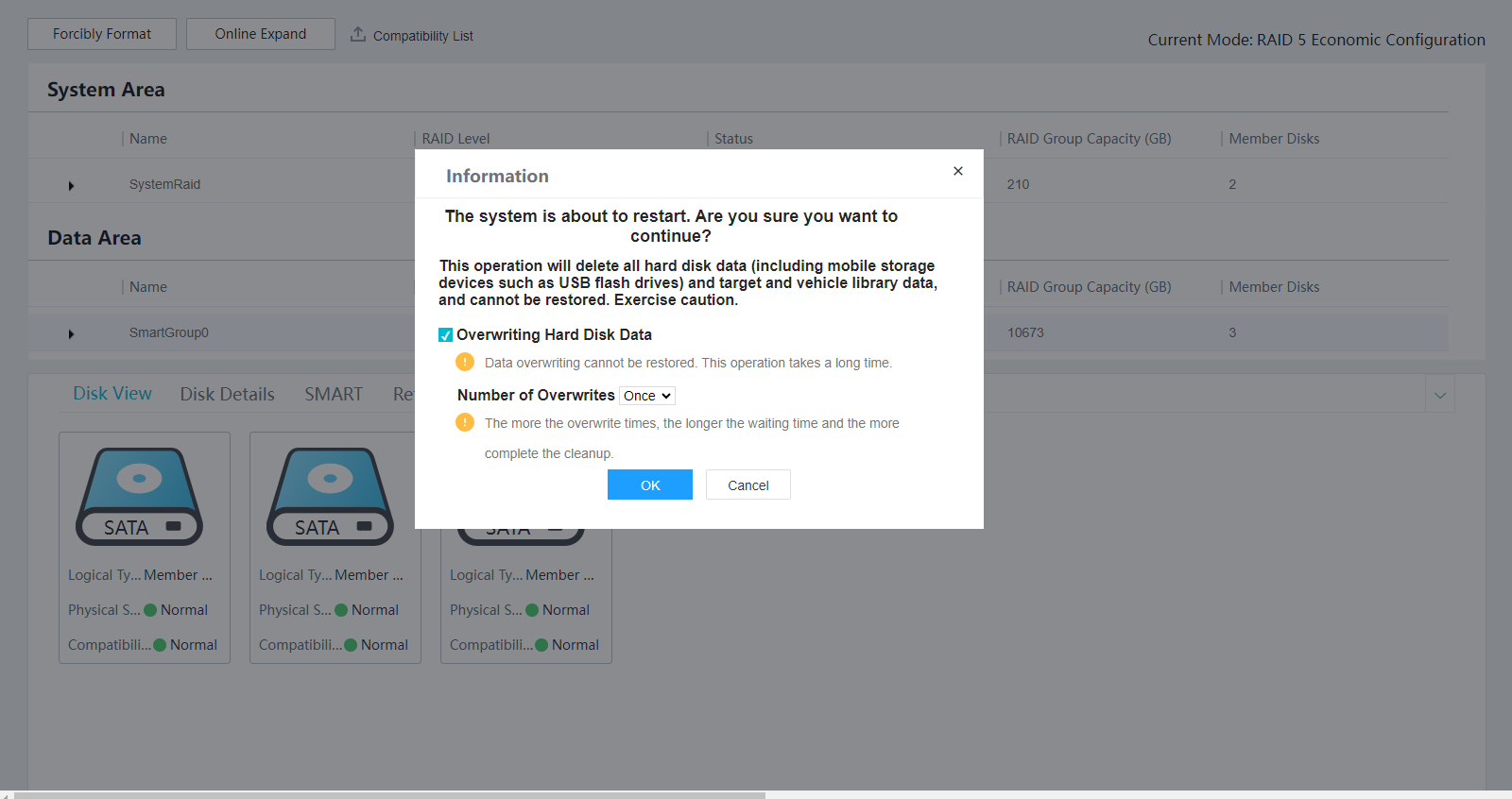
- Select Overwriting Hard Disk Data, set Number of Overwrites based on the site requirements, and click OK, as shown in Figure 6-34.
- Perform re-confirmation as prompted.
- Enter the device password and click OK.

- It takes a long time to overwrite data. Additionally, deleted data cannot be restored after data overwriting.
- A larger number of overwrite times indicates a longer waiting time and more complete data deletion.
- Related services are unavailable during the formatting.
- (Optional) To ensure data security, further clear the disk data by referring to the guide provided by the disk vendor.
- Disk formatting will delete all data from hard disks and removable disks (such as removable hard disks and USB flash drives). Before performing this operation, remove removable hard disks from USB ports to prevent data loss.
- Some data is stored on the device. Therefore, after this operation, some data can still be found, but the associated images or recordings cannot be viewed.
If you want to clear the data stored on the device, you are advised to press Reset on the device to restore the device to factory settings.
- Log in to the OMU portal as the admin user. (
Software Package Integrity Protection
Software integrity protection provides the ability to verify software validity and prevent the installation of insecure or unauthenticated software or prevent installed software from being tampered with or infected with viruses. The integrity protection mechanism of software packages is implemented by using digital signatures.
Basic Principles for Digital Signatures
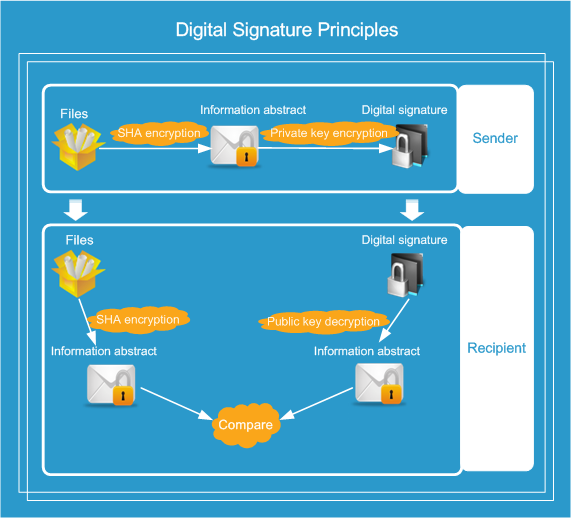
- The sender and recipient need to apply for public and private keys representing their identities.
- The sender uses the secure hash algorithm (SHA) to encrypt the file to be sent and generates a message digest.
- The sender uses the private key to encrypt the message digest to form a digital signature, and then sends the encrypted file and message digest.
- The recipient uses the public key to decrypt the message digest and uses the SHA to encrypt the received file to generate another message digest.
- The recipient compares the decrypted message digest with the generated message digest. If they are the same, the information is not damaged or tampered with during transmission. Otherwise, the information is damaged during transmission.
Software Package Integrity Protection Mechanism
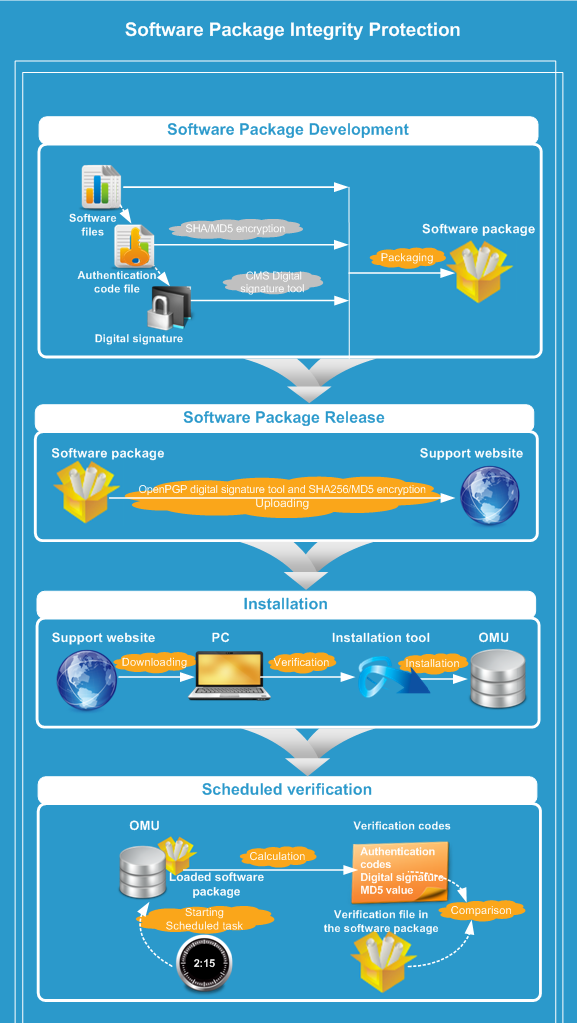
Preparing software packages
- The software package preparation tool calculates the SHA value based on the software package components and generates an .sha256 file. Then, the software package preparation tool calculates the message digest algorithm 5 (MD5) values of all files, including the .sha256 file, in the directory to be packaged and generates an .inner file.
- The Cryptographic Message Syntax (CMS) tool is used to sign the .sha256 file and generate a digital signature file (whose file name extension is sha256.cms).
- The .md5 file, digital signature file, software package components, and verification file are placed together to generate the final software package.
- A software package is signed using the OpenPGP signature tool and encrypted using the SHA256 algorithm. Then a signature file whose file name extension is asc is generated.
- The software package and signature file are upload to the software release platform.
OpenPGP is an open security protocol standard (RFC4880), which is widely used for data encryption and digital signatures. OpenPGP contains an independent digital signature standard, which differs from other digital signature standards in key storage, public key distribution mode, message digest calculation process, signature packet format, and verification process.
Installing software packages
Software Package Installation Scenario |
Description |
|---|---|
Installation scenario |
During installation, OpenPGP uses the public key to verify the software package signature. The software package can only be installed after the software package integrity has been verified. |
Patch or upgrade package installation |
When you upload a patch or an upgrade package on the OMU portal, the package will be loaded. When a software package is being loaded, the public key is used to verify the software signature. The software package can be installed only when it passes the verification. If it does not pass the verification, a failure message will be displayed. |
Suggestions on Patch Management
You need to formulate an application patch management regulation and designate specified personnel to semi-annually inspect the patches.

If patch installation is required, contact the equipment vendor. Do not perform upgrade by yourself.
Security Emergency Response Mechanism
System maintenance personnel must formulate emergency response mechanisms to deal with emergencies, recover the system, and minimize losses.
- System Maintenance Security Principles
- Suggestions on Account Maintenance
- Suggestions on Password Maintenance
- Suggestions on Log Maintenance
- Suggestions on Security Evaluation
- Suggestions on Backup
- Suggestions on Network Connection Changes
- Suggestions on Defect Reports
- Suggestions on Secure Data Destruction
- Software Package Integrity Protection
- Suggestions on Patch Management
- Security Emergency Response Mechanism