Live Video Observation
Live Video Viewing
Feature Description
Definition
Users can remotely view live video shot by cameras to check onsite conditions in real time.
Customer Benefits
Users can view live video from cameras remotely, reducing labor costs.
Users can detect exceptions in a timely manner, improving the efficiency in solving onsite problems.
The behavior of personnel in the detection area can be restricted, achieving a deterrent effect.
Application Scenario
Users in the video security room can view live video of the area where the camera is located.
Requirements
NE |
Version Requirement |
License Requirement |
Function |
|---|---|---|---|
HWT-IVS1800 |
11.1.0 and later versions |
N/A |
Provides the live video viewing function. |
iClient S100 |
V1.6.0 and later versions |
N/A |
Provides the live video viewing function. |
Application Limitations
- Direct connection does not support NAT.
- Field-coded media streams cannot be decoded.
- Live video in MJPEG format cannot be viewed on the LDU. Additionally, you are advised not to play live video from a camera in multiple panes simultaneously.
- The channel-associated voice function is available only for the cameras with microphones configured.
- The LDU does not support the corridor mode.
Feature Configuration
Scenario Description
Client |
Feature Support |
Reference Document |
|---|---|---|
LDU (only HWT-IVS1800-D/HWT-IVS1800-E) |
Supported |
For details, see Configuring Live Video Viewing. |
iClient S100 |
Supported |
For details, see Live Video Viewing. |
Camera Cycling
Feature Description
Definition
Users can play live video from multiple cameras in turn based on specified rules.
Customer Benefits
Cameras are automatically switched, reducing labor costs.
Users can configure cameras in an area as a camera cycling resource to uniformly view the video of the area.
Users can set an execution period for a camera cycling task. During this period, camera cycling is automatically executed, improving operation efficiency and facilitating task arrangement.
Application Scenario
Users can set a camera cycling task for cameras around a warehouse to view the surroundings of the warehouse in turn.
Requirements
NE |
Version Requirement |
License Requirement |
Function |
|---|---|---|---|
HWT-IVS1800 |
11.1.0 and later versions |
N/A |
Provides the function of configuring camera cycling. |
iClient S100 |
V1.6.0 and later versions |
N/A |
Provides the function of configuring camera cycling. |
Application Limitations
None
Feature Configuration
Scenario Description
You can configure a cycling policy to view live video from multiple cameras at a certain interval.
Client |
Feature Support |
Reference |
|---|---|---|
LDU (only HWT-IVS1800-D/HWT-IVS1800-E) |
Supported |
Complete the configuration by referring to this section. |
iClient S100 |
Supported |
For details, see Camera Cycling. |
Prerequisites
- You have configured live video viewing by referring to Configuring Live Video Viewing.
- You have configured preset positions by referring to 4.
Procedure
- Log in to the LDU as the admin user. (
 Logging In to the LDU)
 - Click
 in the lower right corner of the live video pane.
 - Click
 in the upper right corner of the list of cameras to cycle.
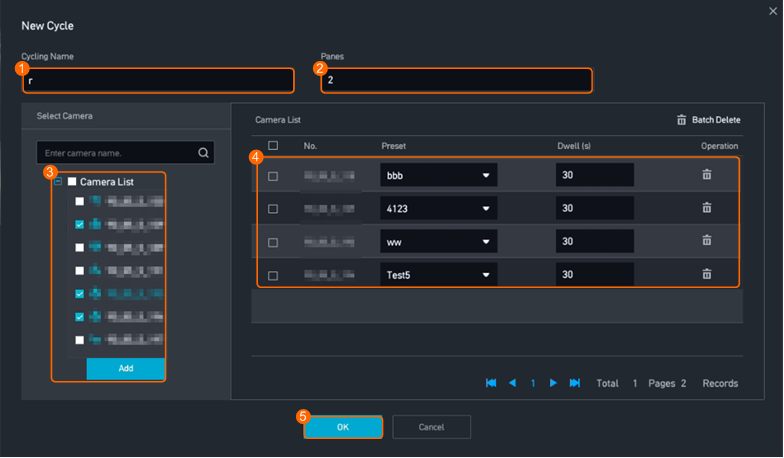
 - Add a cycling policy, as shown in Figure 4-18.
Table 4-14 describes the parameters.
Table 4-14 Parameter descriptionParameter
Setting
Cycling Name
Set the name of a cycling group as required.
Camera List
Select cameras to be added to a cycling group in the device tree.
Panes
The number of cycling panes must be less than the number of cameras to cycle.
Preset
Select a preset position to view live video at the position during cycling.
Dwell (s)
Set the dwell duration for a camera to cycle as required.
Feature Verification
Procedure
- Log in to the LDU as the admin user. ( Logging In to the LDU)
- Click in the lower right corner of the live video pane.
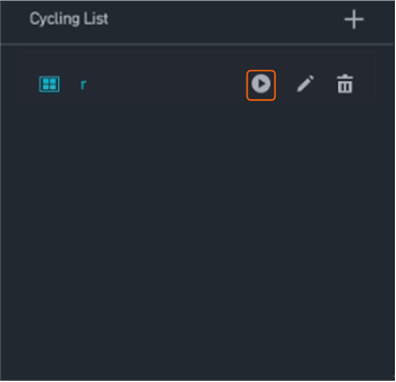
- Start camera cycling, as shown in Figure 4-19.
- Click
 next to any camera to stop the cycling.
Live Video View Management
Feature Description
Definition
Users can quickly invoke or restore preset live video views.
Customer Benefits
Users can quickly access preset live video views, improving work efficiency.
Application Scenario
After a user adds live video from cameras at multiple intersections to favorites, the live video view is displayed upon each login.
Requirements
NE |
Version Requirement |
License Requirement |
Function |
|---|---|---|---|
HWT-IVS1800-D /HWT-IVS1800-E |
11.1.0 and later versions |
N/A |
Provides the live video view management function. |
iClient S100 |
V1.6.0 and later versions |
N/A |
Provides the live video view management function. |
Application Limitations
None
Feature Configuration
Scenario Description
To detect different areas, you do not need to repeatedly drag cameras to live video panes. Instead, you can quickly switch between live video from different cameras by favoriting views.
Prerequisites
You have configured live video viewing by referring to Configuring Live Video Viewing.
Procedure
- Log in to the LDU as the admin user. ( Logging In to the LDU)
- Select a layout as required.
The system supports the following layouts:
 . In this example, select
  .
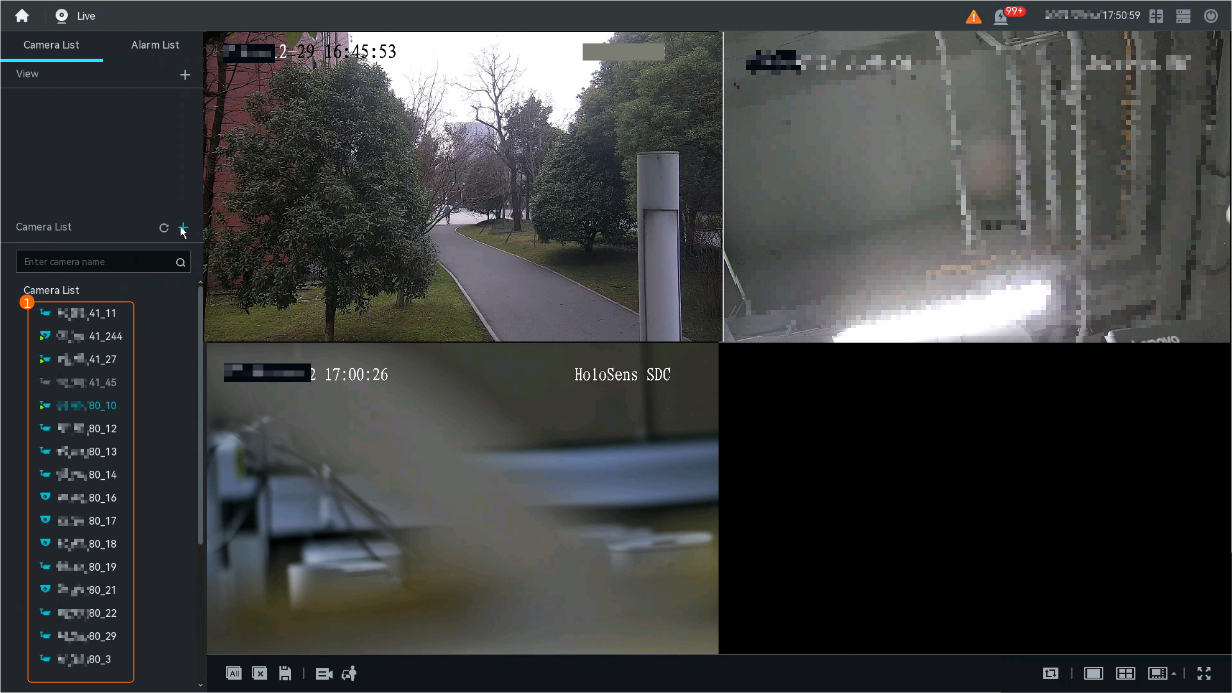
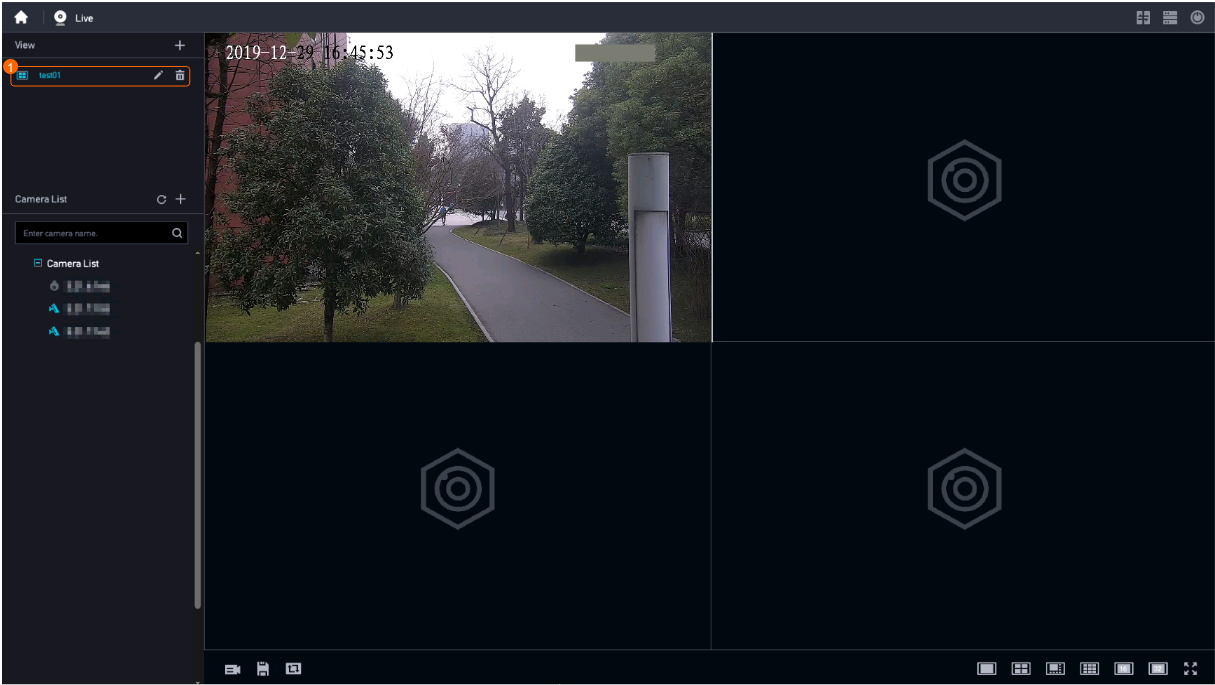
. - Select and drag cameras from Camera List to live video panes, as shown in Figure 4-20.
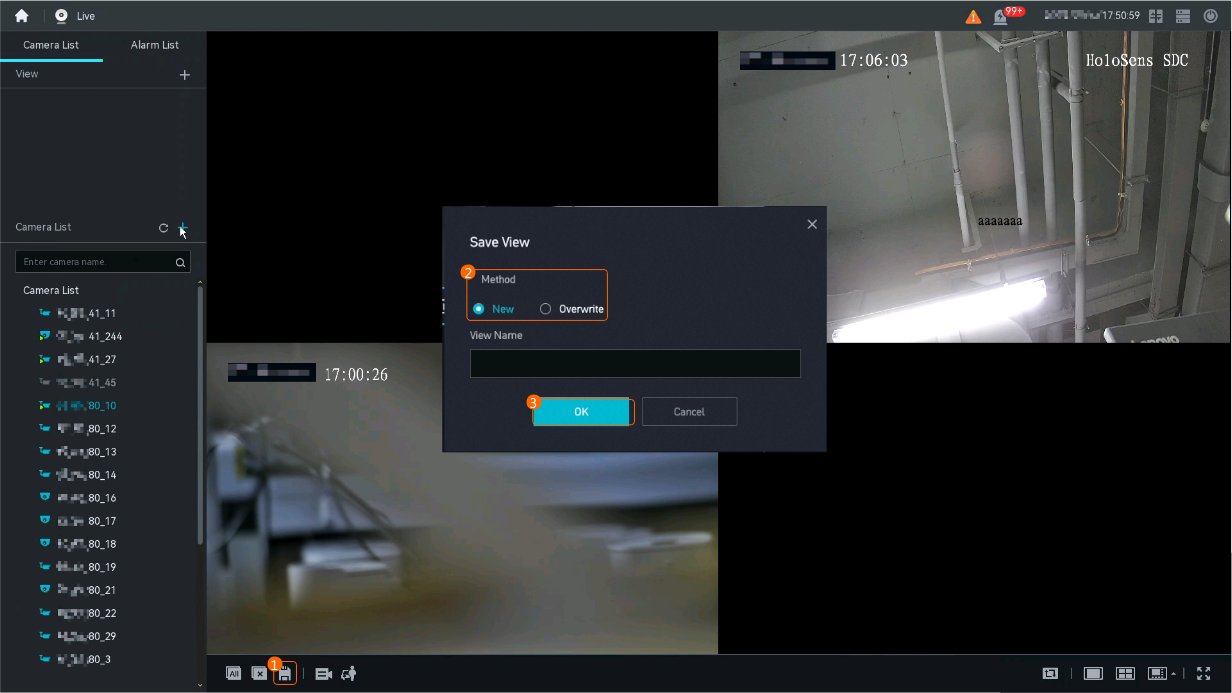
- Favorite the layout as a view, as shown in Figure 4-21.
- You can click
 to create or overwrite a camera view in the layout.
 - You can check favorited views in the View area in the upper left corner of the live video viewing page.
- You can click
Feature Verification
Procedure
- Log in to the LDU as the admin user. ( Logging In to the LDU)
- Invoke the view layout, as shown in Figure 4-22.
Video Wall View Management
Feature Description
Definition
Users can quickly invoke or restore preset video wall views.
Customer Benefits
Users can quickly access preset video wall views, improving work efficiency.
Application Scenario
After a user saves a video wall layout and adds it to favorites, the video wall view is displayed upon each video wall display.
Requirements
NE |
Version Requirement |
License Requirement |
Function |
|---|---|---|---|
HWT-IVS1800 |
11.1.0 and later versions |
N/A |
Provides the video wall view management function. |
Decoder |
- |
N/A |
Provides the function of viewing video on a video wall. |
Application Limitations
- Only the iClient S100 supports video wall view management.
- A video wall supports a maximum of 144 displays.
Feature Configuration
Scenario Description
Live Video Viewing on Video Walls
Feature Description
Definition
Users can play live video from cameras in personalized windows on a video wall.
Customer Benefits
Users can play multiple live video feeds on a video wall as a reference for decision-making.
Application Scenario
During handling of a major incident, incident-related video is played on a large screen as a reference for decision-making.
Requirements
NE |
Version Requirement |
License Requirement |
Function |
|---|---|---|---|
HWT-IVS1800 |
11.1.0 and later versions |
N/A |
Provides the live video viewing function. |
Decoder |
- |
N/A |
Provides the function of viewing video on a video wall. |
Application Limitations
- Video display on video walls in direct connection mode does not support NAT.
- Stream encryption is not supported.
- A maximum of 16 decoder channels can be bound to a video pane.
- A video wall can be divided in to 1, 4, 9, or 16 video panes (must be supported by decoders).
- Recording playback on video walls is supported.
- The video wall is disabled after the computer or client is stopped.
- Computers dedicated for video wall functions are recommended.
Feature Configuration
Scenario Description
Cycling on Video Walls
Feature Description
Definition
Users can play live video from multiple cameras in turn on a video wall based on specified rules.
Customer Benefits
Users can configure cameras in an area as a camera cycling resource to uniformly view the video of the area on a video wall.
Users can set an execution period for a task of camera cycling on a video wall. During this period, camera cycling is automatically executed, improving operation efficiency and facilitating task arrangement.
Application Scenario
Users can configure cameras in an incident-prone area as a camera cycling resource and view the live video from these cameras in turn on a video wall.
Requirements
NE |
Version Requirement |
License Requirement |
Function |
|---|---|---|---|
HWT-IVS1800 |
11.1.0 and later versions |
N/A |
Provides the function of camera cycling on a video wall. |
Decoder |
- |
N/A |
Provides the function of viewing video on a video wall. |
Application Limitations
A single camera cycling supports a maximum of 24 video panes.