Log Reference
Log Overview
Concepts and Purposes
Logs are generated by system processes to record important system information when the system is running.
By viewing and analyzing logs, maintenance engineers can learn about the status of each process in the system. When the system is running abnormally, they can locate and rectify the fault based on logs.
Log Level
Table 6-135 describes log levels.
Log Level |
Description |
|---|---|
ERROR/ERR |
Records general error information during system running, such as authentication failure and invocation failure. |
WARNING/WARN |
Records information about resource exceptions. |
INFORMATIONAL/INFO |
Records system running information when the system is running properly. |
DEBUG |
Records detailed operation information such as user login and logout and running path to help locate faults. |
Log File Path
Module |
Log Type |
Log File Path |
Log Name |
|---|---|---|---|
SMU |
Security log |
/opt/log/ivs_smu/security |
SMU#Device code_security.log |
Operation log |
/opt/log/ivs_smu/operation |
SMU#Device code_operation.log |
|
Run log |
/opt/log/ivs_smu/run |
SMU#Device code_run.log |
|
Interface log |
/opt/log/ivs_smu/interface |
SMU#Device code_interface.log |
|
Debug log |
/opt/log/ivs_smu/debug |
SMU#Device code_debug.log |
|
Device log |
/opt/log/ivs_smu/device |
SMU#Device code_device.log |
|
Module log |
/opt/log/ivs_smu/log |
- |
|
SCU |
Security log |
/opt/log/ivs_scu/security |
SCU#Device code_security.log |
Operation log |
/opt/log/ivs_scu/operation |
SCU#Device code_operation.log |
|
Run log |
/opt/log/ivs_scu/run |
SCU#Device code_run.log |
|
Interface log |
/opt/log/ivs_scu/interface |
SCU#Device code_interface.log |
|
Debug log |
/opt/log/ivs_scu/debug |
SCU#Device code_debug.log |
|
Device log |
/opt/log/ivs_scu/device |
SCU#Device code_device.log |
|
Module log |
/opt/log/ivs_scu/log |
- |
|
OMU |
Security log |
/opt/log/ivs_omu/security |
OMU#Device code_security.log |
Operation log |
/opt/log/ivs_omu/operation |
OMU#Device code_operation.log |
|
Run log |
/opt/log/ivs_omu/run |
OMU#Device code_run.log |
|
Interface log |
/opt/log/ivs_omu/interface |
OMU#Device code_interface.log |
|
Debug log |
/opt/log/ivs_omu/debug |
OMU#Device code_debug.log |
|
Device log |
/opt/log/ivs_omu/device |
OMU#Device code_device.log |
|
Module log |
/opt/log/ivs_omu/log |
- |
|
SYS_OMU |
Security log |
/opt/log/ivs_sys_omu/security |
SYS_OMU#Device code_security.log |
Operation log |
/opt/log/ivs_sys_omu/operation |
SYS_OMU#Device code_operation.log |
|
Run log |
/opt/log/ivs_sys_omu/run |
SYS_OMU#Device code_run.log |
|
Interface log |
/opt/log/ivs_sys_omu/interface |
SYS_OMU#Device code_interface.log |
|
Debug log |
/opt/log/ivs_sys_omu/debug |
SYS_OMU#Device code_debug.log |
|
Device log |
/opt/log/ivs_sys_omu/device |
SYS_OMU#Device code_device.log |
|
Module log |
/opt/log/ivs_sys_omu/log |
- |
|
IMGU |
Security log |
/opt/log/ivs_imgu/security |
IMGU#Device code_security.log |
Operation log |
/opt/log/ivs_imgu/operation |
IMGU#Device code_operation.log |
|
Run log |
/opt/log/ivs_imgu/run |
IMGU#Device code_run.log |
|
Interface log |
/opt/log/ivs_imgu/interface |
IMGU#Device code_interface.log |
|
Debug log |
/opt/log/ivs_imgu/debug |
IMGU#Device code_debug.log |
|
Device log |
/opt/log/ivs_imgu/device |
IMGU#Device code_device.log |
|
Module log |
/opt/log/ivs_imgu/log |
- |
|
OMU_Portal |
Operation log |
/opt/log/ivs_omu_portal/logs |
omu_portal.log (YYYY_MM_DD.log) |
Module log |
/opt/log/ivs_omu_portal/log |
- |
|
Nginx run log |
/opt/log/ivs_omu_portal/nginx |
- |
|
VA NOTE:
The log path of the VA module may be va_a, va_d0, or va_d1. Set the log path to the actual one. |
Security log |
/opt/log/ivs_va/va_d0/security |
VA#Device code_security.log |
Operation log |
/opt/log/ivs_va/va_d0/operation |
VA#Device code_operation.log |
|
Run log |
/opt/log/ivs_va/va_d0/run |
VA#Device code_run.log |
|
Interface log |
/opt/log/ivs_va/va_d0/interface |
VA#Device code_interface.log |
|
Debug log |
/opt/log/ivs_va/va_d0/debug |
VA#Device code_debug.log |
|
eSDK log |
/opt/log/ivs_va/va_d0/esdk |
- |
|
Module log |
/opt/log/ivs_va/log |
- |
|
MCS |
Security log |
/opt/log/ivs_mcs/security |
MCS#Device code_security.log |
Operation log |
/opt/log/ivs_mcs/operation |
MCS#Device code_operation.log |
|
Run log |
/opt/log/ivs_mcs/run |
MCS#Device code_run.log |
|
Interface log |
/opt/log/ivs_mcs/interface |
MCS#Device code_interface.log |
|
Debug log |
/opt/log/ivs_mcs/debug |
MCS#Device code_debug.log |
|
Device log |
/opt/log/ivs_mcs/device |
MCS#Device code_device.log |
|
Module log |
/opt/log/ivs_mcs/log |
- |
|
OCG |
Security log |
/opt/log/ivs_ocg/security |
OCG#Device code_security.log |
Operation log |
/opt/log/ivs_ocg/operation |
OCG#Device code_operation.log |
|
Run log |
/opt/log/ivs_ocg/run |
OCG#Device code_run.log |
|
Interface log |
/opt/log/ivs_ocg/interface |
OCG#Device code_interface.log |
|
Debug log |
/opt/log/ivs_ocg/debug |
OCG#Device code_debug.log |
|
Device log |
/opt/log/ivs_ocg/device |
OCG#Device code_device.log |
|
Module log |
/opt/log/ivs_ocg/log |
- |
|
Nginx run log |
/opt/log/ivs_ocg/nginx |
- |
|
SafeVideo |
Run log |
/opt/SmartData_run/log |
smio_scan.log (Process name.log) |
DCG |
Security log |
/opt/log/ivs_dcg/security |
DCG#Device code_security.log |
Operation log |
/opt/log/ivs_dcg/operation |
DCG#Device code_operation.log |
|
Run log |
/opt/log/ivs_dcg/run |
DCG#Device code_run.log |
|
Interface log |
/opt/log/ivs_dcg/interface |
DCG#Device code_interface.log |
|
Debug log |
/opt/log/ivs_dcg/debug |
DCG#Device code_debug.log |
|
Device log |
/opt/log/ivs_dcg/device |
DCG#Device code_device.log |
|
Module log |
/opt/log/ivs_dcg/log |
- |
|
MU |
Security log |
/opt/log/ivs_mu/security |
MU#Device code_security.log |
Operation log |
/opt/log/ivs_mu/operation |
MU#Device code_operation.log |
|
Run log |
/opt/log/ivs_mu/run |
MU#Device code_run.log |
|
Interface log |
/opt/log/ivs_mu/interface |
MU#Device code_interface.log |
|
Debug log |
/opt/log/ivs_mu/debug |
MU#Device code_debug.log |
|
Device log |
/opt/log/ivs_mu/device |
MU#Device code_device.log |
|
Module log |
/opt/log/ivs_mu/log |
- |
|
LDU |
Security log |
/opt/log/ivs_ldu/security |
LDU#Device code_security.log |
Operation log |
/opt/log/ivs_ldu/operation |
LDU#Device code_operation.log |
|
Run log |
/opt/log/ivs_ldu/run |
LDU#Device code_run.log |
|
Interface log |
/opt/log/ivs_ldu/interface |
LDU#Device code_interface.log |
|
Debug log |
/opt/log/ivs_ldu/debug |
LDU#Device code_debug.log |
|
Device log |
/opt/log/ivs_ldu/device |
LDU#Device code_device.log |
|
Module log |
/opt/log/ivs_ldu/log |
- |
|
PCG |
Interface log |
/opt/log/ivs_pcg/interface |
PCG#Device code_interface_ xxx.log |
Debug log |
/opt/log/ivs_pcg/rtsp/debug |
- |
|
Module log |
/opt/log/ivs_pcg/log |
- |
|
Run log |
/opt/log/ivs_pcg |
PCG#Device code_run_xxx.log |
|
Nginx |
Module log |
/opt/log/ivs_nginx/log |
Monitor_run.log |
Run log |
/opt/log/ivs_nginx/run |
- |
|
SIP |
Debug log |
/opt/log/ivs_sip/debug |
SIP#Device code_debug.log |
Device log |
/opt/log/ivs_sip/device |
SIP#Device code_device.log |
|
Interface log |
/opt/log/ivs_sip/interface |
SIP#Device code_interface.log |
|
Module log |
/opt/log/ivs_sip/log |
- |
|
Run log |
/opt/log/ivs_sip/run |
SIP#Device code_run.log |
|
RIG |
Debug log |
/opt/log/ivs_rig/debug |
RIG#Device code_debug.log |
Device log |
/opt/log/ivs_rig/device |
RIG#Device code_device.log |
|
Interface log |
/opt/log/ivs_rig/interface |
RIG#Device code_interface.log |
|
Operation log |
/opt/log/ivs_rig/operation |
RIG#Device code_operation.log |
|
Run log |
/opt/log/ivs_rig/run |
RIG#Device code_run.log |
|
Security log |
/opt/log/ivs_rig/security |
RIG#Device code_security.log |
|
GaussDB |
Startup and stop logs |
/opt/log/gaussdba |
- |
Run log |
/home/gaussdba/app/data/log/run |
zengine.rlog |
|
Alarm log |
/home/gaussdba/app/data/log/ |
zenith_alarm.log |
|
Operation log |
/home/gaussdba/app/data/log/oper |
zsql.olog |
|
Startup log |
/home/gaussdba/app/data/log |
zenithstatus.log |
|
zctl log |
/home/gaussdba/app/data/log |
zctl-yyyy-mm-dd_xxx.log |
|
Blackbox log |
/home/gaussdba/app/data/log/blackbox |
zengine.blog |
|
Audit log |
/home/gaussdba/app/data/log/audit |
zengine.aud |
|
Trace log |
/home/gaussdba/app/data/trc |
zengine_smon_00003.trc |
|
Archive log |
/home/gaussdba/app/data |
archive_log |
|
zencrypt log |
/home/gaussdba/app/log/oper |
zencrypt.olog |
|
SNMP |
Debug log |
/opt/log/ivs_snmp/debug |
SNMP#Device code_debug.log |
Device log |
/opt/log/ivs_snmp/device |
SNMP#Device code_device.log |
|
Interface log |
/opt/log/ivs_snmp/interface |
SNMP#Device code_interface.log |
|
Operation log |
/opt/log/ivs_snmp/operation |
SNMP#Device code_operation.log |
|
Run log |
/opt/log/ivs_snmp/run |
SNMP#Device code_run.log |
|
Security log |
/opt/log/ivs_snmp/security |
SNMP#Device code_security.log |
|
iClient S100 |
Debug log |
C:\Users\User account for login on the local computer\AppData\Local\iClientS100\cuLog\debug |
IVS_CU_debug.log |
Log Processing Principle
For example, the current SMU security log file is named in SMU#Device code_security.log format.
- When the log file size reaches the maximum, the system automatically archives the log file into an SMU#Device code_security_YYYYMMDDHHMMSS.log file and generates another log file.
In the preceding information, YYYYMMDDHHMMSS indicates the time when the last log is recorded in the original file.
- When the total number of log files reaches the maximum, the system automatically compresses the log file that is generated earliest into a .zip package and moves the package to the log file backup directory /opt/Backup/logback.
Both the current and historical log files are counted.
- When the log file backup directory /opt/Backup/logback occupies 10 GB, the system automatically deletes the earliest log file from the directory.
Log-Related Operations
Collecting Security Logs
Context
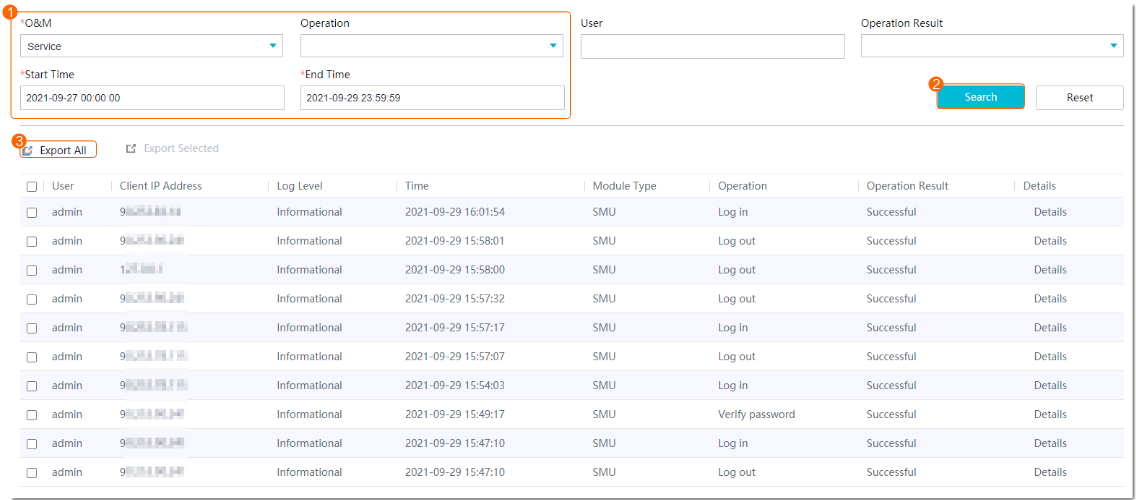
Security logs record user login, logout, authorization, and authentication information.
Procedure
- Log in to the OMU portal as the admin user. (
 Logging In to the OMU portal)
 - Choose Maintenance > Log Manage > Security Logs.
- Collect security logs, as shown in Figure 6-157.
Collecting Operation Logs
Context
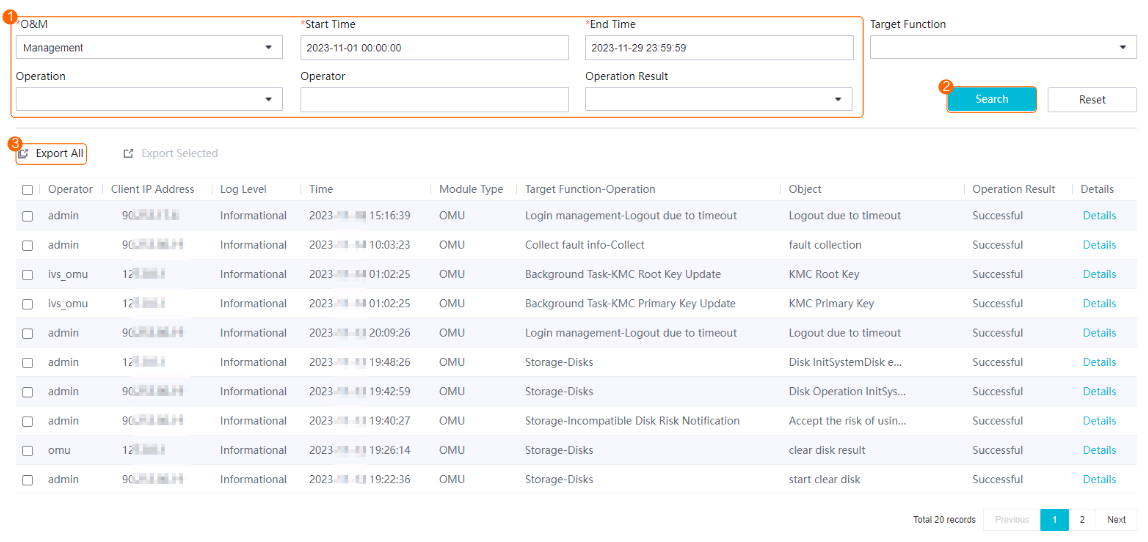
Operation logs record the following:
Information about execution initiated by the system administrator and service administrator.
Log information generated during system maintenance.
Procedure
- Log in to the OMU portal as the admin user. ( Logging In to the OMU portal)
- Choose Maintenance > Log Manage > Operation Logs.
- Collect operation logs, as shown in Figure 6-158.
Collecting Run Logs
Context
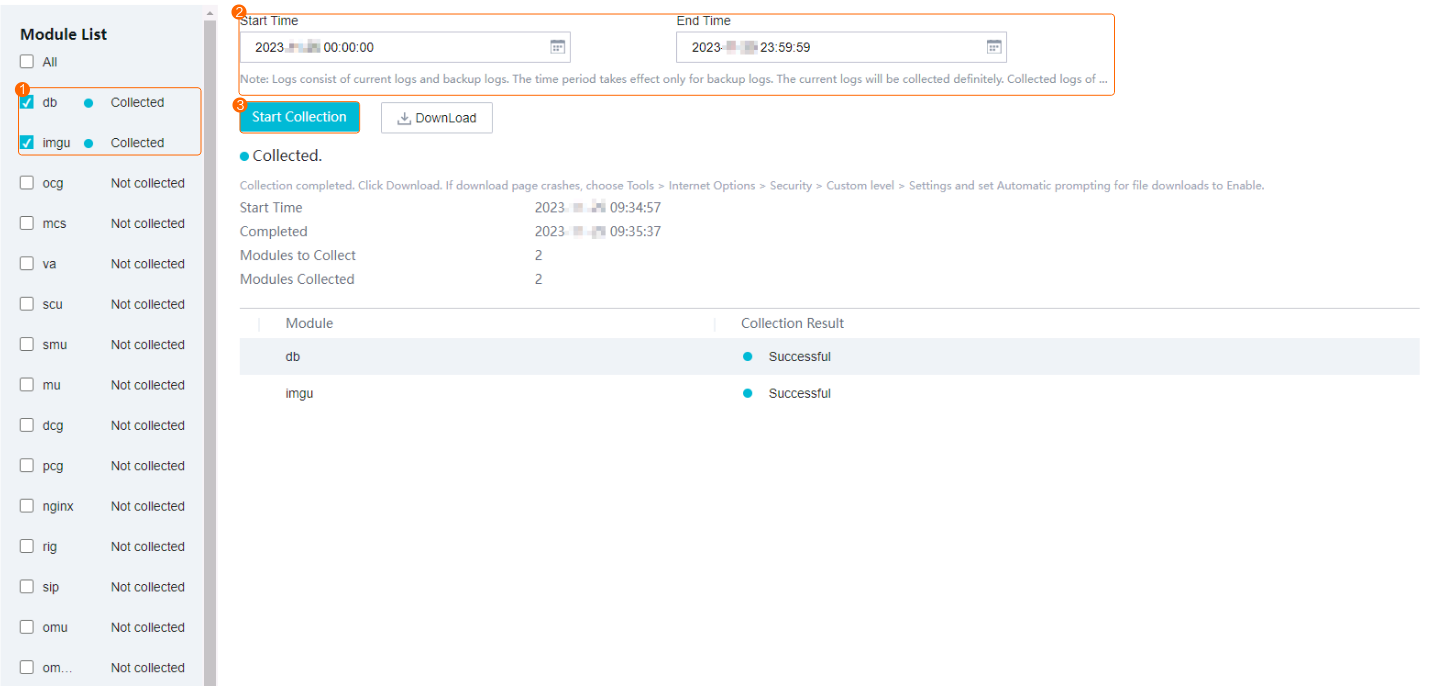
Run logs record the following:
Log information generated by scheduled tasks in the system
System running status and key information about service processing
Log information generated during interface data exchange between internal subsystems and between the device and service systems
Procedure
- Log in to the OMU portal as the admin user. ( Logging In to the OMU portal)
- Choose .
- Collect run logs, as shown in Figure 6-159.
- After the fault information is collected successfully, download the fault information to your local computer.
The downloaded fault information is a .tgz package. Decompress the package to extract the log and config folders. The log folder stores the log information and the config folder stores the module configurations.
Adjusting Log Rules
Context
Log rules include the size and number of log files. Table 6-137 describes the mapping between configuration files.
Module |
Configuration File Path |
Operation |
|---|---|---|
SMU |
/home/ivs_smu/config/log.xml |
|
SCU |
/home/ivs_scu/config/log.xml |
|
OMU |
/home/ivs_omu/config/log.xml |
|
IMGU |
/home/ivs_imgu/config/log.xml |
|
VA |
/home/ivs_va/config/log.xml |
|
MCS |
/home/ivs_mcs/config/log.xml |
|
MU |
/home/ivs_mu/config/log.xml |
|
LDU |
/home/ivs_ldu/config/log.xml |
|
OCG |
/home/ivs_ocg/config/log.xml |
|
RIG |
/home/ivs_rig/config/log.xml |
|
SIP |
/home/ivs_sip/config/log.xml |
|
DCG |
/home/ivs_dcg/config/log.xml |
|
SRVFS |
/home/ivs_srvfs/config/log.xml |
|
SNMP |
/home/ivs_snmp/config/log.xml |
|
OMU_Portal |
/home/ivs_omu_portal/htdocs/config/log.php |
Procedure (General)
The following uses the SMU as an example. The methods of adjusting log rules for other modules are similar.
- Log in to the operating system as the root user. (
 How Do I Log In to the Operating System Through a Network Port?)
 - Adjust log rules.
cd /home/ivs_smu/config
vi log.xml
<?xml version="1.0" encoding="UTF-8" ?>
<Log>
  <LogBasePath>${BP_HOME}/log</LogBasePath>
  <SafeVideoInArm>False</SafeVideoInArm>
  <LogAbsPath>/opt/logfile</LogAbsPath>
  <ModuleType>SMU</ModuleType>
  <NodeCode>5ec4bf169f8444138a8b123285f65feb</NodeCode>
  <LogBufferEnable>True</LogBufferEnable>
  <IsBufferDebugLog>True</IsBufferDebugLog>
  <BufferNumber>100</BufferNumber>
  <RunLog>
    <FileNumber>5</FileNumber>
    <FileSize>10</FileSize>
  </RunLog>
  <DebugLog>
    <DebugLogSwitch>False</DebugLogSwitch>
    <FileNumber>5</FileNumber>
    <FileSize>10</FileSize>
  </DebugLog>
  <InterfaceLog>
    <FileNumber>5</FileNumber>
    <FileSize>10</FileSize>
  </InterfaceLog>
  <SecurityLog>
    <SecurityLogSwitch>True</SecurityLogSwitch>
    <FileNumber>5</FileNumber>
    <FileSize>10</FileSize>
  </SecurityLog>
  <OperationLog>
        <OperationLogSwitch>True</OperationLogSwitch>
    <FileNumber>5</FileNumber>
    <FileSize>10</FileSize>
  </OperationLog>
  <SftpServerInfo>
    <WorkSpace>/logback/SMU</WorkSpace>
    <ServerAddr>127.0.0.1</ServerAddr>
    <ServerPort>22</ServerPort>
    <Username>ivslog</Username>
    <Password>WLSq8YRScM/rFs7bDu04iA==</Password>
    <Iv>WDQwcHE5WTlJUVVoMEhqLQ==</Iv>
  </SftpServerInfo>
</Log>
Table 6-138 describes the key parameters.
Table 6-138 Parameter descriptionParameter
Description
FileNumber
Number of log files.
Value range: 5–10. The default value is 5.
FileSize
Maximum size of a single log file, in MB.
Value range: 10–30. The default value is 10.
xxxxLogSwitch
Indicates whether to enable the log function.
- True: enable
- False: disable
The modification takes effect immediately without service restart.
Procedure (OMU_Portal)
- Log in to the operating system as the root user. ( How Do I Log In to the Operating System Through a Network Port?)
- Adjust log rules.
cd /home/ivs_omu_portal/htdocs/config
vi log.php
- Change the value of FileSize as required.
The modification takes effect immediately without service restart.
Log Format
Security Log
- Security logs of non-debug levels are recorded in the following format:
Date and time|Log level|User account|Client IP address|Static log information|Operation result|Additional log information
Fields are separated with vertical bars (|). Table 6-139 describes these fields in the preceding format.
Table 6-139 Fields in the log formatField
Description
Example
Date and time
Date and time when logs are generated. The value is in the format of YYYY-MM-DDThh:mm:ss.s"s"s"+|-Hh:Mm Euler IVS.
- The value of YYYY-MM-DDThh:mm:ss indicates the year, month, day, hour, minute, and second. Letter T is the abbreviation of Time and is used as a separator.
- The value of s"s"s" indicates the millisecond and is a three-digit decimal number ranging from 000 to 999. This part is optional and is not required when the time accuracy is not in milliseconds.
- The value of +|- indicates the offset from the Coordinated Universal Time (UTC). If the local time is earlier than the UTC time, the value of +|- is +; otherwise, the value is -.
- The value of Hh indicates the hour offset from the UTC time and is a two-digit decimal number ranging from 00 to 13.
- The value of Mm indicates the minute offset from the UTC time and is a two-digit decimal number ranging from 00 to 59.
- Euler IVS: unified identifier of the OS.
2023-03-06T11:09:34.371+08:00 Euler IVS
Log level
Level of generated logs.
Error
User account
Account of the user performing the current operation.
admin
Client IP address
Client IP address.
192.168.10.10
Static log information
Information about the operation being performed.
UserLogin
Operation result
Result of the performed operation.
failed
Additional log information
A string that records the dynamic content in logs in addition to static log information, including key input and output parameters.
User name or password error
Example:
2023-03-06T11:09:34.371+08:00 Euler IVS - - -|Info|admin|192.168.10.10|UserLogin|failed|Error_Code=30899109100000;User name or password error.
This log is generated at 11:09:34 371 on March 6, 2023, which is 8 hours earlier than the UTC time, when the admin user's login fails due to incorrect user name or password.
- For details about the format of security logs at the debug level, see Debug Log.
Operation Log
- Operation logs of non-debug levels are recorded in the following format:
Date and time|Log level|User account|Client IP address|Operation object|Static log information|Operation result|Additional log information
Fields are separated with vertical bars (|). Table 6-140 describes these fields in the preceding format.
Table 6-140 Fields in the log formatField
Description
Example
Date and time
Date and time when logs are generated. The value is in the format of YYYY-MM-DDThh:mm:ss.s"s"s"+|-Hh:Mm Euler IVS.
- The value of YYYY-MM-DDThh:mm:ss indicates the year, month, day, hour, minute, and second. Letter T is the abbreviation of Time and is used as a separator.
- The value of s"s"s" indicates the millisecond and is a three-digit decimal number ranging from 000 to 999. This part is optional and is not required when the time accuracy is not in milliseconds.
- The value of +|- indicates the offset from the UTC. If the local time is earlier than the UTC time, the value of +|- is +; otherwise, the value is -.
- The value of Hh indicates the hour offset from the UTC time and is a two-digit decimal number ranging from 00 to 13.
- The value of Mm indicates the minute offset from the UTC time and is a two-digit decimal number ranging from 00 to 59.
- Euler IVS: unified identifier of the OS.
2023-03-06T11:09:34.371+08:00 Euler IVS
Log level
Level of generated logs.
Info
User account
Account of the user performing the current operation.
admin
Client IP address
Client IP address.
192.168.10.10
Operation object
Function module corresponding to the current operation.
LocalIP
Static log information
Information about the operation being performed.
View Video Record
Operation result
Result of the performed operation.
successful
Additional log information
A string that records the dynamic content in logs in addition to static log information, including key input and output parameters.
-
Example:
2023-03-07T19:33:57.221+08:00 Euler IVS - - - | Error|admin|192.168.1.225|LocalIP|local ip set|failed|Error_Code=30899159116001;
This log is generated at 19:33:57 221 on March 3, 2023, which is 8 hours earlier than the UTC time, when the admin user failed to change the device IP address and received an error code.
- For details about the format of operation logs at the debug level, see Debug Log.
Run Log
- Run logs of non-debug levels are recorded in the following format:
Date and time|Log level|Thread ID|Static log information|Session ID|Operation result|Code file|Line number
Fields are separated with vertical bars (|). Table 6-141 describes these fields in the preceding format.
Table 6-141 Fields in the log formatField
Description
Example
Date and time
Date and time when logs are generated. The value is in the format of YYYY-MM-DDThh:mm:ss.s"s"s"+|-Hh:Mm Euler IVS.
- The value of YYYY-MM-DDThh:mm:ss indicates the year, month, day, hour, minute, and second. Letter T is the abbreviation of Time and is used as a separator.
- The value of s"s"s" indicates the millisecond and is a three-digit decimal number ranging from 000 to 999. This part is optional and is not required when the time accuracy is not in milliseconds.
- The value of +|- indicates the offset from the UTC. If the local time is earlier than the UTC time, the value of +|- is +; otherwise, the value is -.
- The value of Hh indicates the hour offset from the UTC time and is a two-digit decimal number ranging from 00 to 13.
- The value of Mm indicates the minute offset from the UTC time and is a two-digit decimal number ranging from 00 to 59.
- Euler IVS: unified identifier of the OS.
2023-03-06T11:09:34.371+08:00 Euler IVS
Log level
Level of generated logs.
Info
Thread ID
Thread ID generated in logs.
TID:0xFFFF217B5180
Static log information
A string that records the static content in logs.
User login success
Session ID.
A string that records the session ID.
TRACEID:0x000007DC
Log operation result.
Result of the performed operation.
Login success
Code file
Code file where the current log is located.
xxx.cpp
Line number
Number of the line where the current log is located.
315
Example:
2023-03-06T15:24:17.809+08:00 Euler IVS - - - | Info|TID:0xFFFF217B5180|User login success|TRACEID:0x000007DC|Login success|UserLogin.cpp|315
This log, whose thread ID is 0xFFFF217B5180, indicates a successful login to the device, and is recorded in line 315 in the UserLogin.cpp file.
- For details about the format of run logs at the debug level, see Debug Log.
Interface Log
- Interface logs of non-debug levels are recorded in the following format:
Date and time|Interface type|Interface name|Log level|ID of the module invoking an interface|ID of the module receiving data in an interface|Interface ID|Operation content|Operation result|Additional log information
Fields are separated with vertical bars (|). Table 6-142 describes these fields in the preceding format.
Table 6-142 Fields in the log formatField
Description
Example
Date and time
Date and time when logs are generated. The value is in the format of YYYY-MM-DDThh:mm:ss.s"s"s"+|-Hh:Mm Euler IVS.
- The value of YYYY-MM-DDThh:mm:ss indicates the year, month, day, hour, minute, and second. Letter T is the abbreviation of Time and is used as a separator.
- The value of s"s"s" indicates the millisecond and is a three-digit decimal number ranging from 000 to 999. This part is optional and is not required when the time accuracy is not in milliseconds.
- The value of +|- indicates the offset from the UTC. If the local time is earlier than the UTC time, the value of +|- is +; otherwise, the value is -.
- The value of Hh indicates the hour offset from the UTC time and is a two-digit decimal number ranging from 00 to 13.
- The value of Mm indicates the minute offset from the UTC time and is a two-digit decimal number ranging from 00 to 59.
- Euler IVS: unified identifier of the OS.
2023-03-06T11:09:34.371+08:00 Euler IVS
Interface type
Interface type, including NSS, ONVIF, GBT28181, and RESTful.
NSS
Interface name
Interface name.
NSS_DEV_STATUS_REPORT_REQ
Log level
Level of generated logs.
Info
ID of the module invoking an interface
ID of the module invoking an interface.
DCG#a8793b72b911407a8da2d7042fa8b247
ID of the module receiving data in an interface
ID of the module receiving data in an interface.
SCU#a8793b72b911407a8da2d7042fa8b247
Interface ID
ID used in interface messages, which is generated on the initial device, component, or module used in the service process and forwarded in messages to the next device, component, or module until the service process ends.
00000DCGqMsg20230308104426000053
Operation content
Content of the current operation.
dcg send device status report to scu
Additional log information
A string that records the dynamic content in logs in addition to the operation content, including key input and output parameters.
-
Example:
2023-03-08T10:44:26.629+08:00 Euler IVS - - - |NSS|NSS_DEV_STATUS_REPORT_REQ| Info|DCG#a8793b72b911407a8da2d7042fa8b247|SCU#a8793b72b911407a8da2d7042fa8b247|00000DCGqMsg20230308104426000053|dcg send device status report to scu|
This log is generated at 10:44:26 629 on March 8, 2023, which is 8 hours earlier than the UTC time, when the DCG sent a device status query to the SCU. The interface name is NSS_DEV_STATUS_REPORT_REQ.
- For details about the format of interface logs at the debug level, see Debug Log.
Debug Log
Debug-level logs, regardless of types (operation/run/security), are provided for maintenance engineers to locate and analyze faults.
Rules for recording debug-level logs are as follows:
- The debug-level log format contains fields such as the time, name of a file containing codes, line number, debug information, and module identifier.
- Function names, input parameters, and return values are recorded for functions.
- Input parameters, output parameters, and return values are recorded in Parameter name=Parameter value format. Multiple name-value pairs are separated with commas (,).
Example:
2023-03-08 16:40:52.659+08:00[   Info|TID:0x7EC29DD0E0|RtnCode:0x000C]    jovision_common.cpp:00556 channelAbilityofSoundLightAlarm TraceID:NULL|cameraCode[01464484031282240101], sound[0] light[0] soundlight[0]
2023-03-08 16:40:52.658+08:00[  Debug|TID:0x7F9E1540E0|RtnCode:0x003E]    NSSP.cpp:00947  TraceID:0x02003ED6|recv MSG 0x914c from net elem(20105)
- Information about entry and exit of simple functions is not necessarily recorded in debug-level logs. However, if information about entry of functions is recorded, information about exit of functions must also be recorded.
- SQL statements generated in SQL debug logs are the same as those executed in program development codes. Users can copy corresponding SQL statements to the database SQL terminal to query or modify data.
- Logs are generated for all types of messages sent from outside the IVS platform.
- Descriptions contained in debug-level log files must be short and simple.
- Periodic debug-level logs are recorded only when data changes or exceptions occur.
- Debug-level log files contain run logs at all levels. When the debug-level log function is disabled, run logs at non-debug levels are recorded only in run log files. When the debug-level log function is enabled, run logs at non-debug levels are recorded in run log files and run logs at all other levels (such as EMERGENCY, ERROR, WARN, and INFO levels) are recorded in debug log files.